Pet Photography on Your Phone: 15 Tips for Sharp, Happy Animal Photos
By the Share2Earn team · · Updated · 5 min read
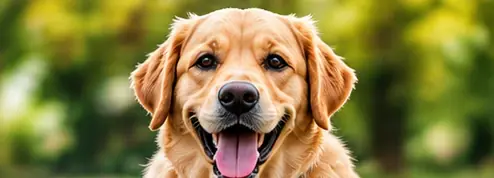
Animals are some of the most loved photos on any social feed, and some of the hardest to take. They move, they will not pose on command, and they often walk straight towards the phone. The good news: with a little patience and 15 simple tips, any phone can take sharp, characterful photos of your pet or the animals you meet around you.
In this article
The three rules of animal photos
Almost every great animal photo follows three rules:
- Get down to their level. Photos taken from human standing height look down on the animal and feel distant.
- Focus on the eyes. If the eyes are sharp, the photo feels alive, even if the rest is a little soft.
- Show personality. A head tilt, a yawn, a muddy paw or a curious look tells viewers who this animal is.
Set up for success
- Use natural light. Near a window indoors, or outside in open shade or golden hour. Bright midday sun makes animals squint and creates harsh shadows; dark rooms cause blur.
- Turn off the flash. It startles animals and creates glowing eyes. If the room is dark, move closer to the window.
- Choose a simple background. A plain wall, grass, a bedsheet or the sky. Move a step to the side to hide clutter behind the animal.
- Shoot when they are calm. After a walk or a meal, most pets are relaxed and willing to sit still for a few seconds.
- Clean the lens. Wet noses love phone lenses.
Taking the photo
- Get on the floor. Sit or lie down so the phone is at the animal's eye level. For small pets, rest the phone on the ground.
- Tap to focus on the nearest eye. Many phones also detect pets automatically and keep their eyes in focus.
- Fill the frame. Get close, or use the 2x zoom, so the animal fills most of the photo. A small pet far away gets lost in the background.
- Use burst mode for anything that moves: running, jumping, catching a ball. Hold the shutter button and choose the sharpest frame later.
- Use a sound to get their attention. A squeak, a click or their name makes them look up and prick their ears. It works only a few times, so be ready.
- Hold a treat just above the phone so their eyes look at the lens. Reward them afterwards so they stay keen.
- Use Portrait mode carefully. It blurs the background nicely, but fur, whiskers and ears can get cut off. Check the edges, and switch to normal mode if it looks fake.
Photo ideas beyond the portrait
- Details: a paw print, whiskers in side light, the pattern of feathers or scales.
- Action: a dog shaking off water, a cat mid-jump, a bird taking off.
- Sleep: curled up in a sunbeam or in an unlikely place.
- Together: an animal with an adult's hands, or two animals interacting.
- In their world: a cat on a wall above the street, cows at a market, ducks on a pond.
Street animals, birds and zoos
You do not need a pet to photograph animals. Street dogs, cats, cows, goats, pigeons, squirrels and garden birds are all around us. Stay safe and kind:
- Keep your distance from unfamiliar animals, especially dogs, cows and monkeys. Use the 2x or 3x zoom instead of walking closer, and never corner or chase an animal.
- Be patient with birds. Sit still near a feeder, a pond or a tree. Birds return within minutes if you do not move.
- At a zoo or aquarium, put the lens flat against the glass to remove reflections, and never use flash or tap on enclosures.
Tip: Do not feed wild animals or disturb nests to get a photo. A respectful photo of an animal behaving naturally is always better.
Edit lightly
Crop so the eyes sit about one third down the frame, straighten the horizon and adjust brightness. Avoid heavy smoothing or "enhance" filters: they make fur look like plastic. Our guide to editing photos on your phone covers each step.
Entering the Pets & Animals Around Me contest
Share2Earn's free Pets & Animals Around Me photo contest is for a photo of your pet or animals you meet around you, with one or more animals as the main subject, taken by you during November 2026. You can enter one photo per topic.
- Only light edits are allowed: crop, rotate, brightness, contrast and colour. No AI-generated or AI-edited images, collages, borders, watermarks or text.
- If people appear, adults must have agreed and children's faces must not be recognisable. A child's hands or back with a pet is fine; a recognisable face is not.
- The photo with the highest engagement score wins, so share your entry with friends and pet lovers.
Coming in January: the Pets & Animals contests
From 1 to 25 January 2027, Share2Earn runs a whole month of free pet and animal contests. Every tip above works for the four photo topics: My Pet’s Best Smile, Pets in Action, Sleepy Pets and Kindness to Animals.
Prefer writing? Tell your pet’s story in 4–6 lines (how to write a pet story) or write one line that gets people to adopt (pet adoption slogans). Feeding the street dogs this winter? Read how to help street animals in winter.
Questions
How do I take sharp photos of a moving pet?
Use good light (near a window or outdoors), turn on burst mode by holding the shutter button, tap to focus on the eyes and pick the sharpest frame afterwards. Calm pets after a walk are easier to photograph.
How do I get my dog or cat to look at the camera?
Hold a treat or toy just above the phone, or make a squeaky or clicking sound. It works best the first few times, so have the camera ready before you make the sound.
Why do my pet's eyes glow in photos?
The flash reflects off a layer at the back of many animals' eyes. Turn off the flash and use natural light instead.
Can I enter a photo of a stray or wild animal?
Yes. The Pets & Animals Around Me topic includes animals you meet around you, as long as the animal is the main subject and you took the photo yourself in November 2026. Keep a safe distance and do not disturb the animal.
Enter the Pets & Animals Around Me photo contest
Free for everyone 18+, worldwide. Entries open 7 November and close 25 November. Real photos taken by you this month only.
See the contest →