Baraat Photography on Your Phone: Dhol, Dance and Night Tips
By the Share2Earn team · · 5 min read
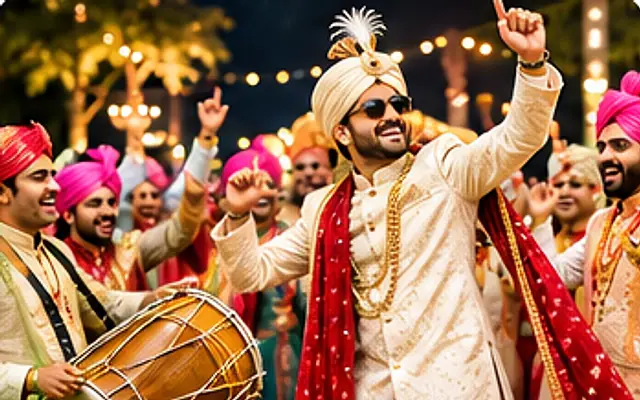
Baraat photography is hard on any camera: it is dark, everyone is moving, and the lights keep changing colour. On a phone it can feel impossible. It isn't. With a few settings and the right place to stand, you can come home with sharp, lively photos of the dhol, the dancing and the groom's big entry. Here are 15 tips for the baraat, the sangeet stage and the wedding dance floor.
In this article
Phone settings for the baraat at night
- Clean the lens first. At night, a smudged lens turns every street light into a hazy streak. Wipe it before the procession starts.
- Flash off. The flash lights up the first person and leaves everyone behind them in the dark. It also blinds the dancers.
- Know when to use night mode. Night mode works by taking a longer exposure. That is great for the lit-up gate or a still group, but it blurs fast dancers. For moving people, switch it off or choose the shortest timer.
- Lower the exposure a little. Tap on a face, then slide the brightness down slightly. Darker photos with clean lights look better than bright, grainy ones with white blobs.
- Charge up. Video and burst mode drain the battery fast. Carry a power bank if you plan to shoot the whole night.
How to photograph dancing without blur
- Use burst mode. Hold the shutter (or swipe it, on some phones) during a jump, a spin or a dhol beat. Keep the one frame where the face is sharp and delete the rest.
- Shoot near the light. The band's light carriers, the gate lights and the stage give the most light. Move so the dancers are between you and a bright source shining on them, not behind them.
- Wait for the pause. Many dance moves have a moment of stillness at the top of a jump or at the end of a spin. Shoot then.
- Let some blur in on purpose. A sharp dhol player with blurred dancers around him shows movement. Brace your phone against your chest and let the scene move.
- Try a Live Photo or a short video. Some phones let you pick a still frame from a Live Photo or video later. The quality is lower, but it can rescue a moment you would otherwise miss.
Baraat photo ideas and angles
- Go low and wide. Hold the phone at waist height and use the 0.5× lens. The dhol, the dancers' feet and the lights all fit in, and the scene looks bigger.
- Photograph the dhol player close up. The sticks in motion, the sweat, the grin. Ask with a nod first: most dhol players are happy to play for the camera.
- Find the faces in the crowd. The groom's mother dancing, an uncle doing his one famous dance move, a friend lifting the groom on his shoulders. These are the photos people remember.
- Shoot the groom's entry from the side. The hired photographer and videographer will be in front. A side or slightly behind angle, with the crowd in the frame, tells a different story.
- At the sangeet, shoot from the edge of the stage. You will get the performers and the audience reacting in one frame.
Tip: Look for a step, a wall or a car bonnet you are allowed to stand near. Even half a metre of height lets you shoot over the crowd.
Stay safe: ghodi, fireworks and crowds
- Give the ghodi space. Horses can be startled by drums, lights and crackers. Don't stand behind it or right beside its legs, and never use the flash near it.
- Keep well back from fireworks and crackers. Shoot them from a distance with a wide lens. Don't walk into the smoke for a closer shot.
- Watch your step on the road. Baraats often move along a public road. Look up from your screen when you move, and keep to the side.
- Don't photograph celebratory gunfire. It is dangerous, it is not something to celebrate, and photos of it are not allowed in the Share2Earn contests. If it happens, move away.
After the baraat: pick and edit
Go through your bursts the next morning. Pick the frame where the main face is sharp, then delete the near-copies so you can see your best shots clearly.
Edit lightly: crop to remove a stranger's arm, straighten the horizon, and bring the shadows up a little. Our phone photo editing basics explain each slider. For more low-light help, read the night photography guide.
Enter the Baraat & Dance photo contest
Share2Earn's free Baraat & Dance contest is open from 1 to 25 December 2026. Enter a photo of a wedding procession, a band, a dhol or people dancing at a wedding.
- You must have taken it yourself at a wedding or wedding function you attended, between 1 November and 25 December 2026. Not the hired photographer's or studio's pictures.
- Adults in the photo must have agreed, and the couple should be happy for you to share it. No children whose faces can be recognised.
- Not allowed: celebratory gunfire, photos where alcohol is the focus, and showing off cash, gold or gifts. So a baraat photo where the notes being waved are the main subject won't fit.
- Light edits only, no AI-generated or AI-edited images, collages, borders, watermarks or text. You must be 18 or older.
The entry with the highest engagement score wins the topic. See how to win online photo contests for what makes people stop and like a photo.
Questions
Should I use night mode for baraat photos?
Use it for still subjects like the lit gate or a posed group. For dancers, turn it off or use the shortest setting, and use burst mode instead, otherwise people will blur.
Why are my wedding dance photos blurry?
In low light the phone uses a slower shutter, so movement blurs. Stand near a bright light, use burst mode, shoot at the pause in a move, and hold the phone against your body.
Can I enter a sangeet dance photo in the Baraat & Dance contest?
Yes, if it shows people dancing at a wedding function and you took it yourself between 1 November and 25 December 2026.
Can I enter a photo of the band or dhol players?
Yes. They are adults in your photo, so they need to be happy to appear in it. A quick nod or a word before you shoot, and showing them the photo afterwards, is usually all it takes.
Enter the Baraat & Dance photo contest
Free for everyone 18+, worldwide. Entries open 1 December and close 25 December. Photos you took yourself at a wedding this season, not the studio’s pictures.
See the contest →